关于微信云托管对象存储那点事
|Word Count:2.2k|Reading Time:9mins|Post Views:
最近在鼓捣一个关于图像处理相关的小程序,出于快速开发考虑,在后台开发这块,没有选择走传统的后台部署服务。毕竟,购买云服务器,注册购买域名以及备案等一系列操作下来,也够让人心累。
这次选择的是微信开发的平台的云托管,至于为什么走的不是云函数开发,其中就涉及到了开发语言的选择–python, 如果改用javascript重写一下,成本有点高,所以最终方案选择云托管。
在按照云托管的部署流程一通走下来后,everything is fine. But…
离大谱的,接口请求和响应,居然不能超过1M, 而我这程序就是关于图像处理的,动不动图片大小就会超过1M。如果非要限制用户图片大小限制在1M以下,太过影响用户体验。
此外我还想过,在用户端使用图像压缩,但图像太大压缩也会存在超过1M的情况,另外清晰度也会受到影响。
在微信开发社区和各个IT论坛找了一圈下来,其实没有比较好的解决方案,最终都需要经过一个中间对象存储的过程。
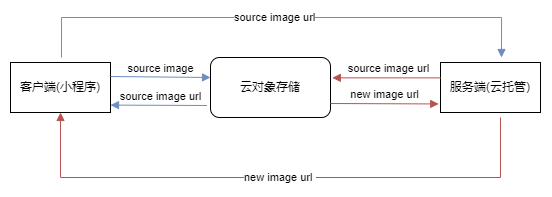
也就是先将图片上传到云上,让后将图片对象的id作为接口入参传入,后台需要使用到图片的时候根据图片id下载即可,然后将处理后的图片,又要上传回云上,返回给客户端新的图片的id,客户端可以根据图片id来获取资源。如下图
对象存储云平台其实很多,例如比较有名的比如七牛,阿里,还有腾讯云自己的。我这里采用了微信云对象存储,具体的使用呢可以参考 微信云托管对象存储,相应的开发手册可以参考对象存储-服务端和其他客户端
为了在后续的开发中更好处理类似的情况,我将微信云托管对象存储做成了一个模块,具体实现情况如下。
首先,需要从自己的小程序或者和云托管平台获取到以下三个重要参数:
APPID : “your-wechat-appid”
SECRET: “your-wechat-secret”
ENV_ID: “your-cloud-env-id”
文件上传 (获取token-获取元数据-上传COS)
微信开放平台如果第三方调用对应接口的话,都是需要鉴权了,所以首先我们需要获取到token值。
1
2
3
4
5
6
7
8
9
10
11
12
13
14
| def _refresh_access_token(self):
"""获取或刷新access_token"""
url = "https://api.weixin.qq.com/cgi-bin/token"
params = {
"grant_type": "client_credential",
"appid": self.appid,
"secret": self.secret
}
response = requests.get(url, params=params, verify=False).json()
if 'access_token' in response:
self.access_token = response['access_token']
self.token_expires = time.time() + response['expires_in'] - 300
else:
raise Exception(f"获取access_token失败: {response}")
|
文件上传可以分成2步:1获取上传元数据,2上传文件到COS。
获取元数据可以理解为向平台发送请求,获取一个用来存放一个文件(存储对象)的一个URL地址, 上传文件到COS可以则可以理解成将资源放到上一步生成的URL地址上,经此,文件才算真正的上传成功了。
1
2
3
4
5
6
7
8
9
10
11
12
13
14
15
16
17
18
19
20
21
22
23
24
25
26
27
28
29
30
31
32
33
34
35
36
| def upload_file(self, local_path, cloud_path):
"""
上传本地文件到微信云存储
:param local_path: 本地文件路径
:param cloud_path: 云端存储路径(如:'images/example.jpg')
:return: 文件ID(用于后续下载)
"""
self._ensure_access_token()
upload_meta_url = "https://api.weixin.qq.com/tcb/uploadfile"
params = {"access_token": self.access_token}
payload = {"env": self.env, "path": cloud_path}
response = requests.post(upload_meta_url, params=params, json=payload,verify=False).json()
print(payload, params)
if response.get('errcode', 0) != 0:
raise Exception(f"上传元数据获取失败: {response}")
cos_url = response['url']
key = cloud_path.split('/')[-1]
print(key)
files = {
"Signature":(None,response['authorization']),
"x-cos-meta-fileid": (None, response['cos_file_id']),
"x-cos-security-token": (None,response['token']),
"key": (None, cloud_path),
'file':(key, open(local_path, 'rb')),
}
upload_resp = requests.post(cos_url, files=files, verify=False)
if upload_resp.status_code != 204:
raise Exception(f"COS上传失败: {upload_resp.text}", upload_resp)
return response['file_id']
|
下载文件相对简单一些,直接调用微信开放平台对外提供的批量下载接口,当然对应的token也是需要的,这部分就不做赘述,代码实现可以参考下方。
1
2
3
4
5
6
7
8
9
10
11
12
13
14
15
16
17
18
19
20
21
22
23
24
25
26
27
28
29
30
31
32
33
34
|
def download_file(self, file_id, local_path):
"""
从微信云存储下载文件
:param file_id: 文件ID(上传时返回的file_id)
:param local_path: 本地存储路径
"""
self._ensure_access_token()
download_meta_url = "https://api.weixin.qq.com/tcb/batchdownloadfile"
params = {"access_token": self.access_token}
payload = {
"env": self.env,
"file_list": [{"fileid": file_id, "max_age": 7200}]
}
response = requests.post(download_meta_url, params=params, json=payload, verify=False).json()
if response.get('errcode', 0) != 0:
raise Exception(f"下载元数据获取失败: {response}")
file_info = response['file_list'][0]
if file_info['status'] != 0:
raise Exception(f"下载错误: {file_info['errmsg']}")
download_resp = requests.get(file_info['download_url'], verify=False)
if download_resp.status_code != 200:
raise Exception("文件下载失败")
with open(local_path, 'wb') as f:
f.write(download_resp.content)
return True
|
以上就是微信云托管上对象存储的上传和下载的实现了。为了方便,我们可以将功能在一个类中实现。此外,考虑到token获取接口是有限制的,每天的调用次数是2000次,而每个token的有效时间是2小时,因此可以重复利用已有token。
最终,完整的代码实现如下:
1
2
3
4
5
6
7
8
9
10
11
12
13
14
15
16
17
18
19
20
21
22
23
24
25
26
27
28
29
30
31
32
33
34
35
36
37
38
39
40
41
42
43
44
45
46
47
48
49
50
51
52
53
54
55
56
57
58
59
60
61
62
63
64
65
66
67
68
69
70
71
72
73
74
75
76
77
78
79
80
81
82
83
84
85
86
87
88
89
90
91
92
93
94
95
96
97
98
99
100
101
102
103
104
105
106
107
108
109
110
111
112
113
114
115
116
117
118
119
120
121
122
123
124
125
126
|
import requests
import time
class WeChatCloudStorage:
def __init__(self, appid, secret, env):
self.appid = appid
self.secret = secret
self.env = env
self.access_token = None
self.token_expires = 0
def _refresh_access_token(self):
"""获取或刷新access_token"""
url = "https://api.weixin.qq.com/cgi-bin/token"
params = {
"grant_type": "client_credential",
"appid": self.appid,
"secret": self.secret
}
response = requests.get(url, params=params, verify=False).json()
if 'access_token' in response:
self.access_token = response['access_token']
self.token_expires = time.time() + response['expires_in'] - 300
else:
raise Exception(f"获取access_token失败: {response}")
def _ensure_access_token(self):
"""确保access_token有效"""
if time.time() >= self.token_expires or not self.access_token:
self._refresh_access_token()
def upload_file(self, local_path, cloud_path):
"""
上传本地文件到微信云存储
:param local_path: 本地文件路径
:param cloud_path: 云端存储路径(如:'images/example.jpg')
:return: 文件ID(用于后续下载)
"""
self._ensure_access_token()
upload_meta_url = "https://api.weixin.qq.com/tcb/uploadfile"
params = {"access_token": self.access_token}
payload = {"env": self.env, "path": cloud_path}
response = requests.post(upload_meta_url, params=params, json=payload,verify=False).json()
print(payload, params)
if response.get('errcode', 0) != 0:
raise Exception(f"上传元数据获取失败: {response}")
cos_url = response['url']
key = cloud_path.split('/')[-1]
print(key)
files = {
"Signature":(None,response['authorization']),
"x-cos-meta-fileid": (None, response['cos_file_id']),
"x-cos-security-token": (None,response['token']),
"key": (None, cloud_path),
'file':(key, open(local_path, 'rb')),
}
upload_resp = requests.post(cos_url, files=files, verify=False)
if upload_resp.status_code != 204:
raise Exception(f"COS上传失败: {upload_resp.text}", upload_resp)
return response['file_id']
def download_file(self, file_id, local_path):
"""
从微信云存储下载文件
:param file_id: 文件ID(上传时返回的file_id)
:param local_path: 本地存储路径
"""
self._ensure_access_token()
download_meta_url = "https://api.weixin.qq.com/tcb/batchdownloadfile"
params = {"access_token": self.access_token}
payload = {
"env": self.env,
"file_list": [{"fileid": file_id, "max_age": 7200}]
}
response = requests.post(download_meta_url, params=params, json=payload, verify=False).json()
if response.get('errcode', 0) != 0:
raise Exception(f"下载元数据获取失败: {response}")
file_info = response['file_list'][0]
if file_info['status'] != 0:
raise Exception(f"下载错误: {file_info['errmsg']}")
download_resp = requests.get(file_info['download_url'], verify=False)
if download_resp.status_code != 200:
raise Exception("文件下载失败")
with open(local_path, 'wb') as f:
f.write(download_resp.content)
return True
if __name__ == "__main__":
APPID = "your-wechat-appid"
SECRET = "your-wechat-secret"
ENV_ID = "your-cloud-env-id"
storage = WeChatCloudStorage(APPID, SECRET, ENV_ID)
try:
file_id = storage.upload_file("../test.png", "image/test2.png")
print(f"文件上传成功,File ID: {file_id}")
except Exception as e:
print(f"上传失败: {e}")
try:
storage.download_file(file_id, "downloaded_image.jpg")
print("文件下载成功")
except Exception as e:
print(f"下载失败: {e}")
|
以上就是关于对象存储管理相关的内容了,如果你在开发类似的功能过程中有类似的idea或者遇到一些难搞的坑,欢迎一起讨论。